Showing posts with label Blogging tips. Show all posts

Saturday, 11 April 2015

10 Awesome Tips To Make Your Blog Popular!

10 Awesome Tips To Make Your Blog Popular!

 
blogging tips
Making a blog popular is not an easy tasks. It takes lots of efforts and time. A successfull blog is not achieved over night it requires patience and hardwork. In this post i will share will you few blogging tips to make your blog popular. This are some of tips that every blogger must know to boost his blog traffic. Especially if you have just started blogging or you are planning to start a brand new blog then don't miss this bloggers tips to have better future of your blog.

1. Blog Template  (Look)

Choosing Blog Template should be your first step in starting a blog. As it says "First Impression is the Last Impression". Before reading your blog content what visitors see is your blog look So if the template is dark and messy you can loose lots of traffic. So always use bright and simple blog template.

2. Social Media

Social Media plays Important role in boosting your blog traffic. Most of blog recieve blog traffic from Facebook, Twitter, Google+ So its very important to increase followers on social media sites.

3. Attractive Post Image

While writing new blog article always add attractive images to your post. As it will attract more visitors to read your article. But always make sure to choose images that are relevant to content of your article.

4. Interact with Followers

Always stay connected with your blog visitors. Check your comments frequently and answer their queries. Appreciate them for their comments and reading your article.

5. Do not copy

Do not copy doesn't mean that you can not post what your fellow blogger had already  posted. It mean that  you can not copy and paste it on your blog. You can post it in your own style with your flavour and by giving credits to your fellow bloggers who first posted it.

6. Easy Navigation

You blog should be simple and easy to navigate. You can achieve this by adding a Drop down Menu, Categories List on the sidebar and widgets for Popular and Recent posts.

7. Post Length

The length of your blog should be about 700 - 1400 words. Your blog post should not be lesser than 700 words as google penalize such blogs. If your blog is on technology your post can be small but you should post more then 2 times a day. In simple words it depends on nature of blog but always try to post your article with more then 700 words.

8. Contests

Always start interesting contests that benefits your blog visitors to keep your readers active and increase your blog followers.

9. Post Regulary

Good blogger always posts regularly and keep their readers up to date on new technology. Posting regularly will helps you to increase your alexa rank.

10. SEO Friendly Content

Lean some basic about SEO and try to write SEO friendly blog post title as well as post content. This can really help you to make your blog popular.

How To Add Border Around Post Images On Blogger

How To Add Border Around Post Images On Blogger ?

  Add Border Around Post Images On Blogger
Sometime you wish that there should be some style to your blog images like drop shadow or borders. In this simple tutorial i will teach you to add borders around your post images on blogger using few simple CSS Code. Lets do it!

Hot To Add Border Around Blog Images?

1. Go to Blogger > Template > Edit Html
2. Now search for ]]></b:skin> 
3. Copy/Paste the following code just above ]]></b:skin> 
/*--Mybloggersworld.com--*/
.post img
{
     border:1px solid #e3e3e3;
     border-radius:10px;
     padding: 10px;
}
4. Save the template and you are done.
5. Make following changes to change style, color or size of the border.
  • Increase 1px to increase the width of border
  • change solid to dotted or dashed to change style of border
  • Replace #e3e3e3 to change border color
  • Remove border-radius: 10px; to remove the radius around the corners

Tips For Boosting Up Your Blog's Subscriber Base

Tips For Boosting Up Your Blog's Subscriber Base

blog subscribersMany beginners tend to underestimate the importance of building a strong subscriber base for their blogs. A successful blog isn’t just well written and well-presented content, its maintaining a dedicated and passionate subscriber base who would read your content and spread it across their own networks. Engaged readers provide long term and reliable traffic to your blog.



While there is no denying that building a loyal subscriber base can be a tricky and long process, it can be done with dedication and hard work by the bloggers. So those who do work on it need to do it right to make sure their time is well utilized. Today we take a look at 5 Tips to boost up your blog's subscriber base.

1. Give your readers a reason to subscribe

subscribe incentive
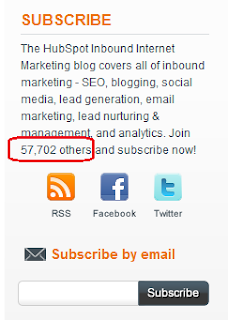
If someone visits your blog and sees a “Subscribe” button there, he/she should know exactly what they will get from subscribing to your blog. For example, if your blog is about Internet Marketing, you should have a text that says “covers all inbound marketing, SEO marketing and email marketing”. Giving your readers an incentive to subscribe is a plus that will push them to subscribe to your site. Everybody likes free stuff, so will your readers. Offer them an exclusive ebook or something relevant on a certain topic that was not covered in your posts in return for subscribing to the blog.


2. Simpler is better

simple website design
It’s a basic rule of web design that your website should lead the user to the desired action in less than three clicks. In this case, the subscription process can be made as simple as one-click. Soon enough you’ll figure out that there are many people out there who are unfamiliar with the concept of RSS Feeds. Try explaining to them how it works and how wonderful it is. Then, of course, there are readers who simply don’t prefer RSS. In that case provide them with an alternative, most commonly, an email subscription to your blog.


3. Produce Quality Content

While it may be obvious, but no matter how great your marketing and subscription strategies for your blogs are, your readers will never return to you if they are not satisfied with the content. Try to find peak traffic times for your blog and post on those times to touch the as many readers as possible. If posting on those times is a problem for you, schedule your posts to be published, schedule your posts to be published on the specified timings. Write frequently and write well. That is the key concept.

4. Leverage Social Proof

leverage social proof
People tend to follow the masses, its human nature. That remains true in case of blogging. You can make use of this to make people subscribe to your blog. While this scheme may not work particularly well for a newer blog, it can work handsomely for a blog with a decent number of subscribers. Display the number of subscribers your blog has next to the subscribe button. Not only does this boost their confident in your blog, but also pushes them to subscribe to a blog that is followed and trusted by many.

5. Use All Available Resources

social media
Use your existing blogs, website, social media profiles to convince audience to subscribe to the blog. If you already have a subscriber base elsewhere, you can easily convince them to subscribe to the blog since they already enjoy your content. They might even recommend your RSS feed to others. Add social media sharing buttons to the blog posts. If your readers enjoyed a post, they can share it with their Facebook/Twitter/LinkedIn networks and eventually some of them will end up subscribing to your blog. Let the readers do some work too.

Although there is a lot more you can do to help your blog gain more subscribers, these tips pretty much form the gist of them. So what have you done to increase the subscriber base of your blog

How To Write The Perfect Guest Post That Is Never Rejected

How To Write The Perfect Guest Post That Is Never Rejected

writing perfect guest posts
As a blogger, you are constantly looking for more exposure. Writing guest posts for blogs is a great way to gain online reputation among the audience of your niche. However, with the Panda, Penguin and Hummingbird updates from Google, publishers are far more careful and particular about what they publish on their website. We recently posted on how blog owners should deal with guest posts on their blogs, today we'll take a look at how writers can write effective guest posts that will never be rejected.


Even though some publishers no longer accept guest posts, many still do, but with a tougher acceptance criteria. So what really makes a guest post great? Today we share with you 5 tips on how to write the perfect guest post that never gets rejected.

1. Find the right publisher

best publisher for guest post
Firstly, as mentioned above, not all publishers accept guest posts. So you need to be certain of their stance towards guest posts before working on it.
Secondly, as tempting as it may be to submit your post directly to Mashable or TechCrunch, it would be very difficult to get yourself published there without building up your online reputation first. It would be like expecting a promotion on your first day at work. So do aim at getting published at these sites, but start with smaller sites with lower PR where you have better chances of getting published.

2. Be creative and factual

research
If you’re writing on a topic that has already been covered by hundreds of blogs online, multiple times, you’re not giving your audience anything interesting to read, nor are you giving the publishers a reason to consider you. Be creative with your choice of posts. Even if you produce low-quality content, don’t worry about it. It will gradually improve.
Keep in mind that when you’re writing on a certain topic, do your research and use facts for your argument. No one cares what your opinion is, they are interested in the facts. Use expert quotes, charts and research to build a sound argument for yourself that would convince the readers.

3. Know the Prerequisites for the Guest Post

prerequisites for guest post
Since you are writing for someone else, you need to follow their rules and regulations. Take a look at the blogs regulations to create content that matches their requirements. Do give special attention to the link exchange protocols they have established. You don’t want to give yourself a bad name by violating them and end up getting your article rejected as well. Add links that make sense at the location even a twitter account or a link to your blog’s homepage would do, but not a link to a random company page. It’s categorized as a bio.

4. Choose Trendy Topics

trendy topics
Know what’s up in the blogosphere. Keep track of what’s popular among your readers. Even if you are being creative with writing about something that used to be popular quite a while back or has a short term lifetime, you’re not helping yourself. Go for article that people read today and will continue to read in the days to come. It’s the easiest way to generate reliable long term traffic from a single blog post.

5. Follow your readers

follow your readers
A good guest post always gathers comments from the readers. Follow them. Take their feedback. Sometimes they can give your valuable input that can eventually improve your writing and researching skills. Answer their questions, for it strengthens the bond between you and your readers. Interact with them and build a reputation for yourself among your target audience.

If you follow these tips well enough, you can write the perfect guest post that will never be rejected. However, these skills come with time and practice, so if you’re a starter and had to face rejection from publishers, learn from your mistakes and work better the next time.

Awesome VLC Media Player Trick

Awesome VLC Media Player Trick

vlc tricks
In this tutorial i will share a simple trick yet interesting trick i came across while surfing on the internet. I will call it VLC Inception trick. This trick is simple and works on windows xp as well as windows 7. If you know this trick then its great if you don't then lets dive into it.

How To Do This Trick ?

  1. Open Vlc Media Player.
  2. Then Press Cltr + N
  3. Now Type "Screen://" (without quotes)
  4. Click on Play and watch this simple little trick.